
1주차 스터디 실습 정리 본문
반응형
서종호(가시다)님의 AEWS 4기 스터디 내용을 기반으로 참고하여 학습 목적으로 작성하였습니다.
1주차) EKS Cluster Endpoint Access 소개
Mac 로컬 환경 세팅 (awscli, k8s tools, teraform)
# Install aws cli
brew install awscli
aws --version

# iam (주체) 자격 증명 설정
aws configure
AWS Access Key ID : <액세스 키 입력>
AWS Secret Access Key : <시크릿 키 입력>
Default region name : ap-northeast-2

# 확인
aws sts get-caller-identity

# 기본 Key Pair 생성 (pem 파일 생성)
aws ec2 create-key-pair \
  --key-name my-keypair \
  --query 'KeyMaterial' \
  --output text > my-keypair.pem

# 권한 설정
chmod 400 my-keypair.pem

# 확인
aws ec2 describe-key-pairs --key-names my-keypair

# Install kubectl
brew install kubernetes-cli
kubectl version --client=true

# Install krew
brew install krew

# Install k9s
brew install k9s

# Install kube-ps1
brew install kube-ps1

# Install kubectx
brew install kubectx


# kubectl 출력 시 하이라이트 처리
brew install kubecolor
echo "alias k=kubectl" >> ~/.zshrc
echo "alias kubectl=kubecolor" >> ~/.zshrc
echo "compdef kubecolor=kubectl" >> ~/.zshrc

# k8s krew path : ~/.zshrc 아래 추가
export PATH="${KREW_ROOT:-$HOME/.krew}/bin:$PATH"

# Install Helm
brew install helm
helm version

# tfenv 설치
brew install tfenv

# 설치 가능 버전 리스트 확인
tfenv list-remote

# 테라폼 특정 버전 설치
tfenv install 1.14.6

# 테라폼 특정 버전 사용 설정
tfenv use 1.14.6

# tfenv로 설치한 버전 확인
tfenv list

# 테라폼 버전 정보 확인
terraform version

# 자동완성
terraform -install-autocomplete

## 참고 .zshrc 에 아래 추가됨
cat ~/.zshrc
autoload -U +X bashcompinit && bashcompinit
complete -o nospace -C /usr/local/bin/terraform terraform
EKS Public Endpoint Cluster 실습
# 코드 다운로드
git clone https://github.com/gasida/aews.git
cd aews
tree aews

# 작업 디렉터리 이동
cd 1w

# 변수 지정
aws ec2 describe-key-pairs --query "KeyPairs[].KeyName" --output text
export TF_VAR_KeyName=$(aws ec2 describe-key-pairs --query "KeyPairs[].KeyName" --output text)
export TF_VAR_ssh_access_cidr=$(curl -s ipinfo.io/ip)/32
echo $TF_VAR_KeyName $TF_VAR_ssh_access_cidr

# 배포 : 12분 정도 소요
terraform init
terraform plan
nohup sh -c "terraform apply -auto-approve" > create.log 2>&1 &
tail -f create.log


# 자격증명 설정
aws eks update-kubeconfig --region ap-northeast-2 --name myeks

# k8s config 확인 및 rename context
cat ~/.kube/config
cat ~/.kube/config | grep current-context | awk '{print $2}'
kubectl config rename-context $(cat ~/.kube/config | grep current-context | awk '{print $2}') myeks
cat ~/.kube/config | grep current-context
EKS Public&Private Endpoint Cluster 실습
# 코드수정
#  endpoint_public_access = true
#  endpoint_private_access = true
#  endpoint_public_access_cidrs = [
#    var.ssh_access_cidr
#  ]
terraform apply -auto-approve
EKS Fully Private Cluster 실습
#EKS Fully Private Cluster 배포
# 실습 디렉터리 진입
cd eks-private

# 변수 지정
aws ec2 describe-key-pairs --query "KeyPairs[].KeyName" --output text
export TF_VAR_KeyName=$(aws ec2 describe-key-pairs --query "KeyPairs[].KeyName" --output text)
export TF_VAR_ssh_access_cidr=$(curl -s ipinfo.io/ip)/32
echo $TF_VAR_KeyName $TF_VAR_ssh_access_cidr

# 초기화
terraform init
terraform plan

# vpc 배포 : 2분 소요 -> 이후 aws vpc 정보 확인!
terraform apply -target="module.vpc" -auto-approve

#bastion EC2 접속 후 확인
# bastion ec2 접속
ssh -o StrictHostKeyChecking=no ubuntu@$(terraform output -raw bastion_ec2-public_ip)

# admin IAM User 자격 증명 설정
aws configure

# 자격증명 설정
aws eks --region ap-northeast-2 update-kubeconfig --name eks-private
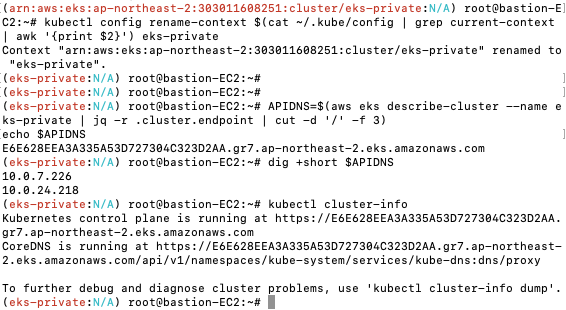
kubectl config rename-context $(cat ~/.kube/config | grep current-context | awk '{print $2}') eks-private

# eks access endpoint 확인
APIDNS=$(aws eks describe-cluster --name eks-private | jq -r .cluster.endpoint | cut -d '/' -f 3)
echo $APIDNS
4924E16AD07400AA0CA66718E179E887.gr7.ap-northeast-2.eks.amazonaws.com

dig +short $APIDNS
10.0.14.147
10.0.28.171

# kubectl 조회 시도 : DNS Lookup resolved" host="4924E16AD07400AA0CA66718E179E887.gr7.ap-northeast-2.eks.amazonaws.com" address=[{"IP":"10.0.28.171","Zone":""},{"IP":"10.0.14.147","Zone":""}]
kubectl cluster-info
kubectl get node -v=9
...
	curl -v -XGET  -H "Accept: application/json;as=Table;v=v1;g=meta.k8s.io,application/json;as=Table;v=v1beta1;g=meta.k8s.io,application/json" -H "User-Agent: kubectl/v1.34.2 (linux/amd64) kubernetes/0ea4984" 'https://4924E16AD07400AA0CA66718E179E887.gr7.ap-northeast-2.eks.amazonaws.com/api/v1/nodes?limit=500'
 >
I0312 18:36:06.092396    2708 round_trippers.go:547] "HTTP Trace: DNS Lookup resolved" host="4924E16AD07400AA0CA66718E179E887.gr7.ap-northeast-2.eks.amazonaws.com" address=[{"IP":"10.0.28.171","Zone":""},{"IP":"10.0.14.147","Zone":""}]

# eks 등 배포 : 14분 소요
terraform apply -auto-approve

# 자격증명 설정
aws eks --region ap-northeast-2 update-kubeconfig --name eks-private
kubectl config rename-context $(cat ~/.kube/config | grep current-context | awk '{print $2}') eks-private

# kubectl 조회 시도
kubectl get node -v=7
...
I0312 18:01:51.102015   28018 round_trippers.go:527] "Request" verb="GET" url="https://4924E16AD07400AA0CA66718E179E887.gr7.ap-northeast-2.eks.amazonaws.com/api?timeout=32s" headers=<
        Accept: application/json;g=apidiscovery.k8s.io;v=v2;as=APIGroupDiscoveryList,application/json;g=apidiscovery.k8s.io;v=v2beta1;as=APIGroupDiscoveryList,application/json
        User-Agent: kubectl/v1.35.2 (darwin/arm64) kubernetes/fdc9d74
 E0312 18:02:21.493542   28018 memcache.go:265] "Unhandled Error" err="couldn't get current server API group list: Get \"https://4924E16AD07400AA0CA66718E179E887.gr7.ap-northeast-2.eks.amazonaws.com/api?timeout=32s\": dial tcp 10.0.14.147:443: i/o timeout"

# 자격증명 삭제
rm -rf ~/.kube/config
결과화면
[VPC]

[EKS]

[Public Endpoint]
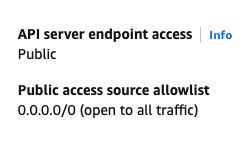

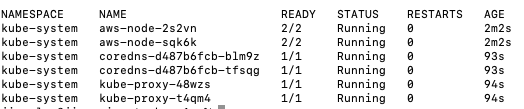
[Public & Private Endpoint]

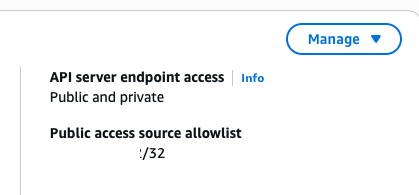
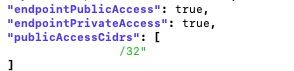
[Private Endpoint]
후기
실무에 도움이 되는 도구 - 사람 친화적인 설정
| 기능 | 효과 |
| k9s | GUI처럼 관리 |
| kubectx/kubens | 빠른 환경 전환 |
| kube-ps1 | 사고 방지 |
| kubecolor | 가독성 |
| alias | 속도 |
| krew | 확장성 |
새로 알게된 내용
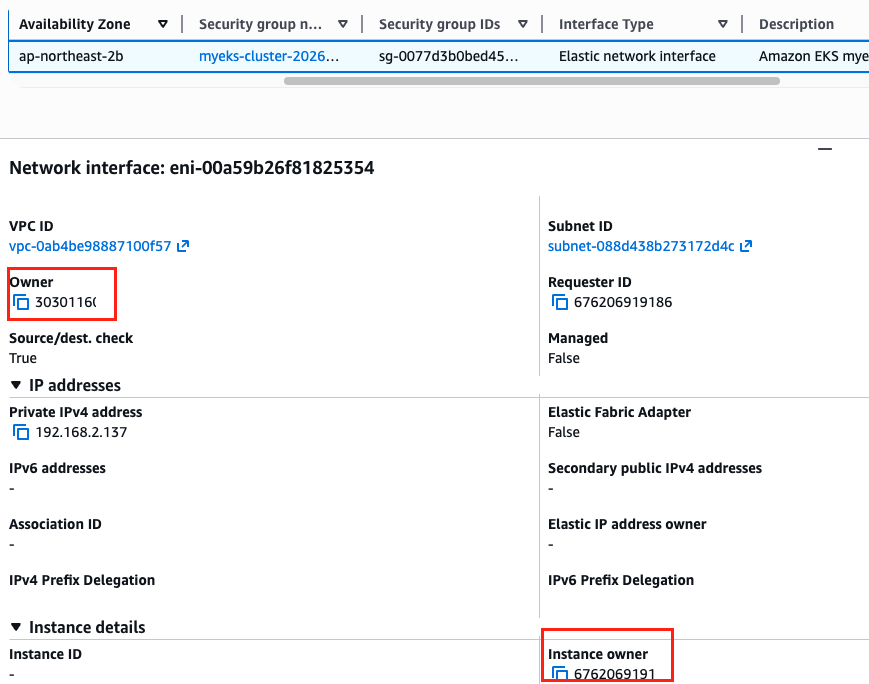
ENI owned ENI 확인 - 소유주와 인스턴스 소유주가 다른 것 확인
Comments